
What happens to your social media when you die? Memorialise, delete or leave it alone (UK)
Most of us now leave a long trail of photos, posts and messages behind us, but very few people have stopped to ask what actually happens to all of that when we die. Thinking about your Facebook, Instagram or LinkedIn after death can feel oddly distant or a bit morbid, so it’s easy to avoid.
We’ll look at the main platforms (Facebook, Instagram, X/Twitter, LinkedIn, WhatsApp and others), the usual options: memorialise, close or leave alone, and a few simple planning steps to reduce stress and scams for the people you leave behind.
What happens to my social media when I die?
If nobody does anything, most social media accounts just sit there. Your Facebook, Instagram or X/Twitter profile can stay visible for years, still showing old posts, likes and photos. Friends might still get birthday reminders, see your name pop up in “People you may know”, or find you listed in old groups.
What actually happens depends on the platform:
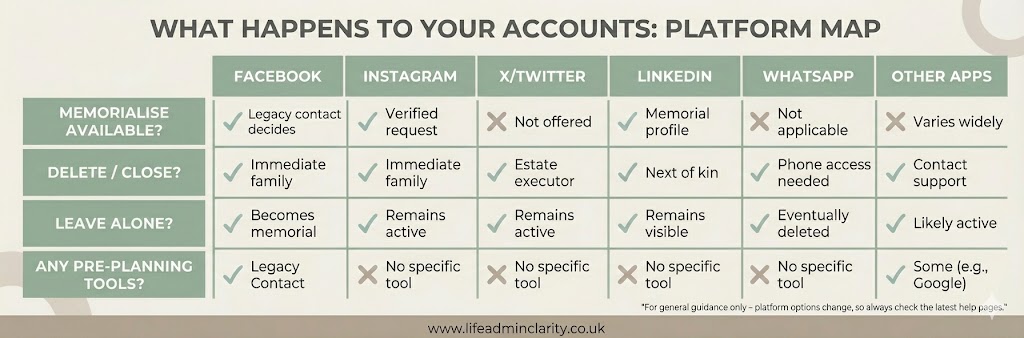
- Facebook and Instagram can be turned into memorial accounts or deleted.
- X/Twitter and most others only really offer deactivation/closure or leaving the account as-is.
- LinkedIn can be memorialised or closed, but there’s no way to plan that from your side while you’re alive.
- WhatsApp and other messaging apps mainly sit on the phone – chats stay in other people’s phones even if your account is deleted.
So if nobody acts, your “digital self” simply carries on in the background, which may or may not be what you’d want.
Options for your profiles – memorialise, close or leave alone
For most mainstream platforms, there are three broad choices:
- Memorialise – turning the profile into a fixed memorial.
- On Facebook, this adds “Remembering” above your name and freezes the account so new posts go on a “tributes” area rather than your main timeline. It stops new logins and reduces upsetting prompts like birthday reminders.
- Instagram has a similar memorial mode but no way to set things up in advance.
- On Facebook, this adds “Remembering” above your name and freezes the account so new posts go on a “tributes” area rather than your main timeline. It stops new logins and reduces upsetting prompts like birthday reminders.
- Close/delete – removing the account entirely.
- Family or executors can usually request this with proof of death and proof of their relationship or legal role. Once deleted, posts and photos are gone from that platform.
- X/Twitter and many smaller platforms only offer closure or leaving it alone, there’s no memorial option.
- Family or executors can usually request this with proof of death and proof of their relationship or legal role. Once deleted, posts and photos are gone from that platform.
- Leave it alone – doing nothing.
- This might be fine for some older or low-key accounts.
- The downside is that your profile can be misused, for example, scammers making fake accounts or confusing contacts (see my separate Social Media Scams article). Also, people may keep getting reminders at awkward moments.
- This might be fine for some older or low-key accounts.
There’s no single “right” answer. Some people like the idea of a Facebook memorial page where friends can share memories. Others would much rather everything is tidied up and deleted.
How can I plan for my social media in advance?
Most people never get round to this, so if you’re even reading about what happens to your social media when you die in the UK, you’re already ahead. You don’t need anything complicated, just a few clear notes.
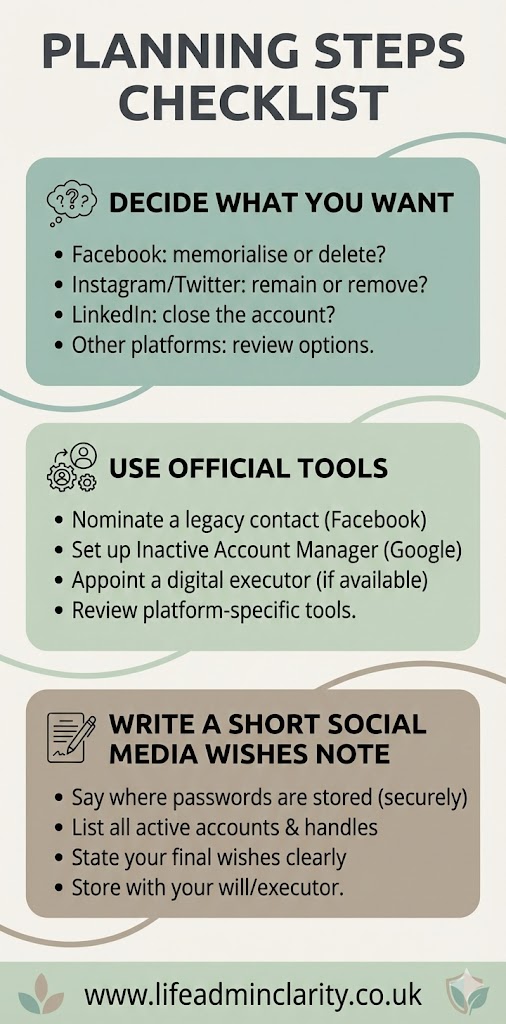
1. Decide roughly what you’d like for each major platform
Take your main accounts – for many people that’s Facebook, Instagram, X/Twitter, LinkedIn and WhatsApp – and jot down a simple preference for each:
- Facebook – memorialise / delete / leave alone
- Instagram – memorialise / delete
- X/Twitter – deactivate / leave alone
- LinkedIn – memorialise / close (there’s a separate LinkedIn article that can help you think this through in more detail)
- WhatsApp – delete account on my phone / leave alone
If you use TikTok, Reddit, forums, gaming or dating apps, add those too.
2. Use any official legacy / nomination tools
Where they exist, these are worth using:
- Facebook Legacy Contact – you can nominate someone to manage your memorialised profile (approve friend requests, pin a post, update photos) but they can’t read your private messages. More details can be found on the Facebook Help Centre.
- Apple Legacy Contact – more about photos and iCloud than social media but very useful for your wider digital life. More details can be found on the Apple Support Pages.
Other platforms currently don’t offer much in the way of pre-planning.
3. Write a short “social media wishes” note
Rather than putting this in your will, keep it simple in a separate note or digital wishes letter, for example in your “death folder”:
- List your main accounts.
- State what you’d like done with each (memorialise, delete or leave alone).
- Say who you’d like to handle it, if that’s different from your main executors.
- Mention where passwords are stored (for example, “in my password manager” or “in a sealed envelope with my will”) but don’t write actual passwords in the note.
That’s usually enough to give your family confidence that they’re doing what you would have wanted.
What your executor or family can (and can’t) do
After a death, family members and executors are often unsure what they’re allowed to do with social media accounts.
In practice, they usually start by making a list of platforms – checking the person’s phone, email inbox and paperwork for clues. Then they decide which ones to deal with first: typically Facebook, Instagram, X/Twitter and LinkedIn, plus anything linked to money or ongoing payments.
Most platforms have online forms to:
- Report a death and ask for memorialisation (Facebook, Instagram, LinkedIn).
- Request closure/deactivation (X/Twitter, LinkedIn, some others).
They’ll generally ask for:
- A copy of the death certificate or obituary.
- Proof of identity for the person making the request.
- Sometimes proof of legal authority (for example, evidence that you’re an executor) – this is more common with LinkedIn and similar.
A key point: even if family know the passwords, UK law and platform terms mean they’re not automatically free to log in as the person who’s died, especially to read private messages. The Computer Misuse Act and platform terms are there to stop unauthorised access. In practice, families often use access that already exists on a phone or browser to tidy things, but it’s safer to rely on the official bereavement routes where possible. This is general information, not legal advice.
Executors can also, where appropriate, download copies of photos and posts from some platforms before they’re closed, which can be a gentle way of preserving memories without keeping the account itself going.
Grief scams, fake profiles and protecting your family
Sadly, scammers do pay attention to deaths. There are a few common problems worth planning around:
- Imposter or fake accounts – someone creates a new Facebook or Instagram profile using the deceased’s name and photos, then sends friend requests to family and friends to try to get money or information.
- “Grief harvesting” scams – criminals watch public death announcements, then send convincing messages pretending to be from funeral directors, charities, banks or government bodies.
- Misuse of images and posts – photos lifted from public profiles and used in spam or fake adverts.
Tidying up major accounts or memorialising Facebook fairly soon after a death can reduce some of this, simply by making it clearer which profile is genuine and less attractive to copy. Keeping profiles private also helps.
For your future executors and family, a simple “what to watch for” list is useful:
- Be cautious about accepting new friend requests in the weeks after a death, especially duplicate profiles.
- Report any fake or suspicious accounts straight away using platform tools.
- Keep death and funeral details on social media fairly limited – avoid full addresses, exact dates and times if you can share those privately instead.
- Treat emails and messages about bills, fines or charity donations after a death with suspicion; go to the organisation’s official website rather than clicking links.
Most people never get round to sorting this, so don’t worry if your social media plans are currently “a bit of a muddle”. A realistic next step is simply this: pick your three main platforms and jot down what you’d like to happen to each, then pop that note in your death folder or with your other life admin.
This is general information for adults in England and Wales If your situation is unusual – for example, you run a business through social media or have complex professional accounts – it’s worth getting tailored advice from a solicitor or other suitable professional.